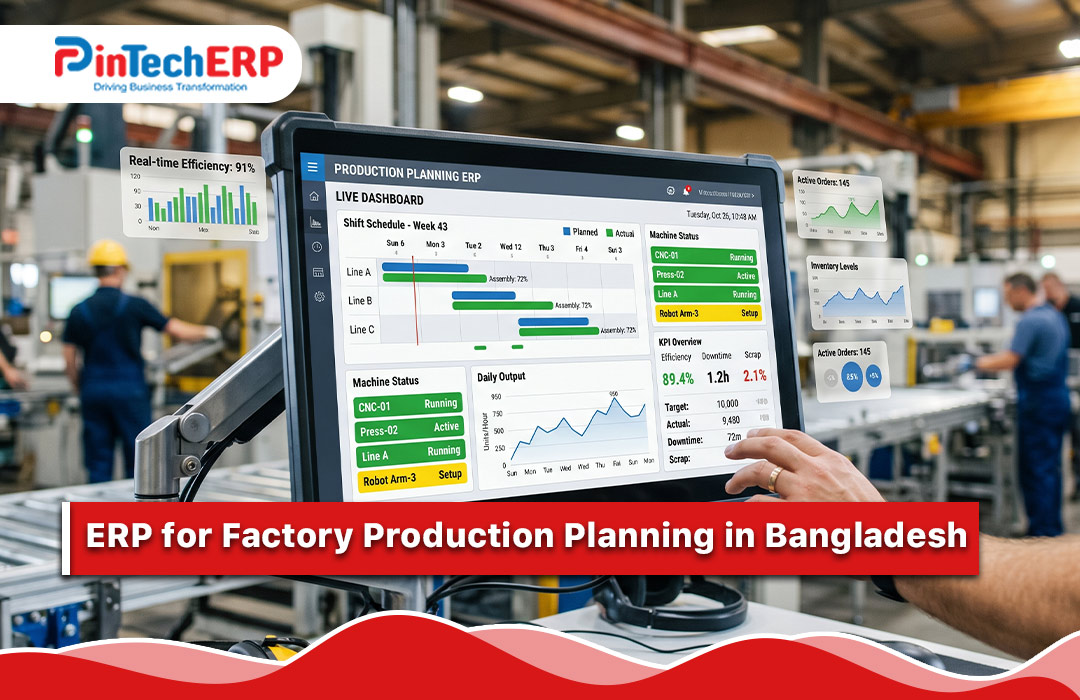
Production planning ERP decides what to make, when and with which material, machines and people, based on real orders and real stock. It checks material and capacity before work starts, gives the shop floor clear work orders and shows the plan against actual output each day. The result is fewer delays, less idle time and more on-time delivery.
This guide is for factory owners, production managers and planners in Bangladesh who are tired of plans that change every hour.
Why factory plans fail
Most factories do plan. But the plan lives in a notebook, an Excel sheet or a manager’s head. It does not check whether material is available, whether the machine is free or whether a rush order is about to break everything. So the plan collapses and gets rebuilt by phone calls.
Common problems:
- Material is missing when production starts. The line waits, and delivery slips.
- Machines are overloaded or idle. Some wait for work while others are jammed.
- Rush orders upset everything. Nobody can see the effect on other orders.
- Promised dates are guesses. Sales commits dates without checking capacity.
- Too many changeovers. Small runs in a bad order waste time.
- WIP is invisible. Nobody knows how much is in each stage.
- Late discovery of delays. The problem is found at the delivery date.
- Power and breakdown stops are not planned for.
- Planning and purchase are separate. Purchase buys without knowing the plan.
The building blocks of production planning
Think of planning in four layers.
1. Demand. What do customers want, and when? Confirmed orders, forecasts, and stock replenishment for standard items.
2. Material. What material is needed for that demand, what is in stock, what is already ordered and what must be bought. This is MRP, material requirement planning. It uses the bill of materials (BOM). See key modules of manufacturing ERP.
3. Capacity. Which machines, lines and people are available, for how many hours, and what can they produce per hour?
4. Schedule. The order of work on each machine or line, with start and end times, aligned with material arrival and delivery dates.
What production planning ERP should do
1. Order intake and promise dates. Sales enters an order and sees an earliest possible date, based on material and capacity, not a guess.
2. BOM and routing. BOM lists material and quantity. Routing lists the steps, machines and standard times for each product. Together, they let the system calculate material and time.
3. Master production schedule. The plan of what to produce, by product and week, from orders and stock targets.
4. Material requirement planning. From the plan and BOM, the system computes needs, compares with stock and open purchase orders, and suggests what to buy and when. See supply chain management software.
5. Purchase link. Suggested purchase requests go to purchase with required dates. For imports, lead time includes LC and shipping. See LC management ERP.
6. Capacity planning. Load by machine and line, week by week. Warnings when load exceeds capacity, so you can add shifts, outsource or move dates.
7. Scheduling. Sequence jobs to reduce changeovers and meet delivery dates. A visual schedule board that planners can adjust.
8. Work orders. A work order for each production job: product, quantity, material list, steps, machine, dates and instructions. Printed or shown on a screen at the line.
9. Material issue. Issue material against the work order, with batch or lot. Shortages are visible before the line starts.
10. Shop-floor reporting. Operators or supervisors record output, rejects, downtime and time used. Simple screens or barcode scans.
11. WIP tracking. Quantity at each stage, by order. See where jobs are stuck.
12. Subcontracting. Material sent to outside processors and received back, with charges and due dates.
13. Quality and rework. Inspection points, defects and rework orders.
14. Maintenance link. Planned maintenance blocks time on the schedule. Breakdowns trigger replanning. See asset management software.
15. Costing feedback. Actual material, labor and machine time against standard. Variance reports.
16. Dashboards and alerts. Orders at risk, material shortages, machine load, plan vs actual and on-time delivery rate.
Features that matter most in Bangladesh
Realistic lead times. Include time for imported material, LC and port clearance.
Power and downtime handling. Easy rescheduling when power or machines fail.
Shift planning. Many factories run two or three shifts, with overtime rules.
Simple shop-floor entry. Supervisors enter data with a few taps, in Bangla if needed.
Order-level view. Merchandisers and sales see status without calling the floor.
Industry fit. Process steps differ across garments, footwear, plastic, paper, tiles and others. See garments ERP, footwear ERP, paper industry ERP and tiles and ceramics ERP.
Simple measures to track
Planning works better when you track a few clear numbers.
- On-time delivery rate: share of orders delivered by the promised date.
- Plan adherence: actual output against planned output.
- Machine utilization: hours used against hours available.
- Downtime: hours lost, with reasons.
- Material shortage count: how many jobs were held up by missing material.
- WIP days: how long goods stay in process.
- Rework rate: share of output needing rework.
Set your own targets from your own history.
Benefits you can expect
Fewer stoppages from missing material. Shortages are seen early.
Better delivery promises. Dates come from real capacity.
Higher machine use. Less idle time and fewer jams.
Lower WIP and stock. You make and buy what the plan needs.
Faster reaction to change. Replan in minutes, not days.
Less firefighting. Managers spend time improving instead of chasing.
See how ERP software saves cost and the ERP ROI calculator.
How to choose
Map your process. Draw the steps from order to shipment, with machines and typical times.
Bring a real order to the demo. Give the vendor one order with a BOM, routing and delivery date. Ask them to run MRP, check capacity, create a schedule and work orders and show the plan against actual.
Ask hard questions.
- How does the system check material and capacity before promising a date?
- How do I handle a rush order and see the impact on others?
- How do I plan around machine maintenance and power cuts?
- How does the shop floor enter output and downtime?
- How are subcontracted steps planned and tracked?
Check data needs. Good planning needs clean BOMs, routings and stock. Ask what the vendor needs from you.
Check support and price. See ERP software price in Bangladesh. For a full framework, read how to choose the right ERP software.
Rollout plan
- Phase 1: clean item master, stock, BOM and purchase.
- Phase 2: routings, work orders and material issue.
- Phase 3: MRP, capacity planning and scheduling.
- Phase 4: shop-floor reporting, WIP and dashboards.
- Phase 5: costing feedback and continuous improvement.
Do not try advanced planning on bad stock and bad BOM data. See ERP implementation steps.
Mistakes to avoid
Planning on wrong BOMs. The plan will be wrong.
Ignoring real capacity. Plans that assume perfect machines fail.
No shop-floor data. Without actual output, you cannot compare.
Over-detailed schedules. Plan to the level your floor can follow.
Treating the plan as fixed. Review and replan often.
Skipping supervisor training.
A short example
A plastic goods factory takes many small orders. Planning is done each morning in a meeting. Material is bought after orders arrive, so jobs wait for resin. Sales promises dates by feeling. Two machines are always busy, and others wait.
After production planning ERP, each order creates material needs from the BOM. Purchase sees shortages early. Capacity load shows which machines are overloaded, and the planner moves work to idle ones. Sales sees a realistic delivery date when taking the order. Late orders fall, and the morning meeting turns from firefighting into review.
Where PintechERP fits
PinCraft is our manufacturing ERP, and our Manufacturing page is the home of this solution. [Add: confirm the planning features you support, such as MRP, capacity planning, scheduling board, work orders, shop-floor entry and WIP. Be honest if advanced scheduling is a roadmap item. Add one named factory client and a screenshot of a schedule or a work order.]
See also ERP software for the manufacturing industry, smart manufacturing ERP and the top 5 production management ERP systems. To try it, request a demo and bring one order with its BOM and steps.
Quick checklist
- Clean BOM and routing
- MRP with stock and open orders
- Capacity load by machine and shift
- Visual schedule and work orders
- Material issue against work orders
- Shop-floor output, rejects and downtime entry
- WIP and subcontract tracking
- Plan vs actual and on-time delivery measures
- Maintenance and costing link
FAQs
What is production planning software? It is software that plans what to make, when and with what material and capacity, and tracks the work on the shop floor.
What is the difference between MRP and production planning? MRP calculates material needs. Production planning also covers capacity, scheduling and shop-floor control.
Do small factories need it? If delays and missing material are common, yes. Start with BOM, stock and work orders.
Can it handle rush orders? A good system shows the impact on other orders so you can decide.
What data do I need first? Item master, BOM, routing times and accurate stock.
How long does setup take? Usually weeks for core modules, with planning features added in phases.